
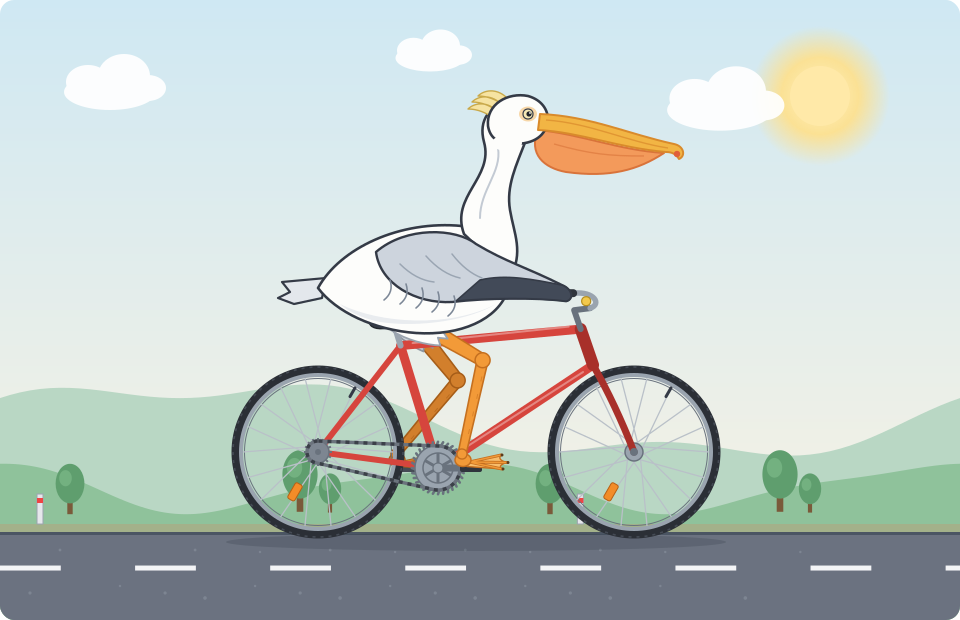
“Generate an SVG of a pelican riding a bicycle” is probably the best-known silly prompt in AI. Here is our answer, written by hand in code: a white pelican pedalling a red bicycle down a country road. The wheels and cranks turn in sync, the webbed feet stay on the pedals, and the SVG itself contains no JavaScript and no inline CSS. Below we explain the benchmark, why the prompt is hard, and how each moving part works.
What Is the “Pelican Riding a Bicycle” Benchmark?
The prompt comes from Simon Willison, co-creator of the Django web framework and author of a widely read blog about large language models. When a new model is released, he asks it the same thing: Generate an SVG of a pelican riding a bicycle. SVG is a text format for vector graphics, so a model that only outputs text can still “draw” by writing shapes and coordinates.
He explained the idea in his June 2025 keynote at the AI Engineer World’s Fair in San Francisco, written up as “The last six months in LLMs, illustrated by pelicans on bicycles”. There he said the benchmark “started as a joke but is beginning to show itself to actually be a little bit useful.” He also noted that models almost always add comments to their SVG, so you can read what each blob was meant to be.
The results are public. His pelican-bicycle repository on GitHub collects outputs going back to models such as Claude 3.5 Sonnet and Gemini 1.5 Pro, and the pelican-riding-a-bicycle tag on his blog runs to more than a hundred posts. Asked whether labs might train on the prompt, he argued in “What happens if AI labs train for pelicans riding bicycles?” that they would get caught: a model that draws perfect pelicans but fails on other animals riding other vehicles would give the game away. The test is not a scored leaderboard, and this article does not rank any model.
Why This Prompt Is So Hard
Building the animation by hand made the difficulty concrete. There are three problems, and each depends on the one before.
1. Bicycle geometry
Willison points out that people struggle to draw bicycles too, because few of us remember the frame. A typical bike has a diamond frame: seat tube, top tube and down tube in front, with chainstays and seatstays forming a rear triangle around the back wheel. The bottom bracket sits slightly below the axles, the seat tube leans back at roughly 73 degrees, and the fork has a small forward rake. Get those wrong and the bike looks like a toy.
2. Pelican anatomy
A pelican needs a very long, flat bill with a hooked tip, a stretchy throat pouch, a small head, a heavy body and short legs ending in fully webbed feet. As Willison puts it, pelicans “can’t ride bicycles. They’re the wrong shape!” The drawing has to bend anatomy just enough without losing the bird.
3. Composition and contact points
A believable rider touches the bike in three places: body on the saddle, feet on the pedals, wings on the handlebars. A text model must place all of them by number alone. Our first draft had the contact points right but still looked odd: the upper legs were long white tubes that read as socks, and the feet were too small to see. Fixing that took several rounds of rendering frames and studying them, a feedback loop a one-shot model never gets.
How the Animation Is Built
A short Python script generates the SVG from a few measurements: wheel radius, wheelbase, bottom-bracket position, crank length, seat-tube angle and the pelican’s hip. Everything else is derived from them, so the motion stays mechanically consistent. Every moving part uses SMIL, the animation language built into SVG.
Spinning wheels with animateTransform
Each wheel is two nested groups: the outer one moves the wheel to its axle, the inner one holds the rim, spokes and hub and spins. They are separate because animateTransform replaces the transform attribute of the element it animates, so a rotation on the same element would erase the position.
<!-- outer group: position only -->
<g transform="translate(292,452)">
  <!-- inner group: rotation only -->
  <g>
    <animateTransform attributeName="transform" type="rotate"
                      from="0" to="360" dur="1s"
                      repeatCount="indefinite"/>
    <circle r="77" fill="none" stroke="#9aa4af" stroke-width="4"/>
    <path d="M4.35,-5.48L75,0 ..." stroke="#b9c0c8"/>  <!-- 18 spokes -->
    <circle r="9" fill="#9aa4af"/>                      <!-- hub -->
  </g>
</g>
Spokes are symmetrical and can look frozen in a screenshot, so an orange reflector and a valve stem break the symmetry and make the rotation obvious.
Keeping the feet on the pedals
The crank rotates once every two seconds around the bottom bracket. Each pedal sits in a group that counter-rotates by the same amount, so pedal and foot stay level, as real pedals do. For the legs, the script takes 48 evenly spaced moments in the pedal cycle, finds where the ankle must be, and solves two-bone inverse kinematics: from the hip, the ankle and the two leg lengths, the law of cosines gives the knee angle, with the knee pointing forward. Those angles become the values of two nested rotations on the crank’s timing. The browser interpolates between key frames with an error well under a pixel, so the feet stay glued to the pedals.
Rolling without slipping
Skidding wheels break the illusion instantly, so the road markings move at exactly the speed of a rolling tyre: one circumference per revolution. With a radius of 86 units and one revolution per second, that is about 540 units per second. The dashes repeat every quarter circumference, so their loop lasts exactly a quarter of a second. The chainring is twice the radius of the rear cog, a 2:1 ratio, so the wheels turn twice per crank turn, and the chain’s link plates travel around their loop at the matching speed using animateMotion.
Secondary motion
The body dips slightly with each pedal stroke, and because the hips move with it, the inverse kinematics includes the bob. The head nods a beat later, the pouch wobbles, a few feathers flutter and the eye blinks every few seconds. Clouds, hills, trees and posts scroll at different speeds for parallax; each layer is drawn twice side by side and slides one copy’s width before repeating, so the loop is seamless.
Animating SVG Under a Strict Content Security Policy
This site’s Content Security Policy allows styles and scripts only from its own files, with no 'unsafe-inline'. That rules out a <style> block in the SVG, any style="" attribute and any <script>. Instead, colours and line widths are presentation attributes such as fill and stroke, and movement comes from <animate> and <animateTransform>, which are SVG markup rather than script. The standalone file is served under the same policy and follows the same rules. Cross-browser testing turned up one surprise: in Firefox, <animate> on presentation properties such as opacity or stroke-dashoffset triggered CSP style-src-attr reports under this policy, while animateTransform, animateMotion and geometry animations such as d and ry did not. So the wind streaks scale and slide instead of fading, and the chain links ride the chain path. With those choices, SMIL needs no CSP exceptions.
Accessibility: Titles, Descriptions and Reduced Motion
The SVG has role="img" and is labelled by a <title> and a <desc>, so screen readers announce a description rather than hundreds of shapes. Motion needs more care: some people get dizzy or nauseous from animation and ask their device to reduce motion, which browsers expose as prefers-reduced-motion. SMIL ignores CSS animation properties, so animation-play-state: paused does nothing here. Instead, when reduced motion is requested, a media query in the site stylesheet hides the animated SVG and shows a static still of the same scene, loaded lazily so other visitors never download it. A small script in the site’s own JavaScript file also adds a Pause animation button that calls the SVG pauseAnimations() method, in the spirit of WCAG’s “Pause, Stop, Hide” guideline.
Performance Notes
The animated SVG is about 48 KB of markup, roughly 8 KB gzipped, with 74 animation elements. Almost every animation moves whole groups with transforms; apart from the blinking eyelid, the only shape that changes is the pouch. Forty-eight key frames per pedal cycle keep the legs smooth without bloating the file. If you build something similar, test on a phone, keep animated elements few, and give readers a way to pause.
Try the Benchmark Yourself
To run the prompt yourself, use Willison’s exact wording so results are comparable, and keep the SVG source as well as a screenshot. Then check the frame shape, the feet and the three contact points. You will quickly see why a convincing pelican on a bicycle is still a small achievement.
Frequently Asked Questions
What is the pelican riding a bicycle benchmark?
An informal test popularised by developer Simon Willison: ask a language model to “Generate an SVG of a pelican riding a bicycle” and judge the drawing it writes as code. He says it started as a joke; it is not a scientific leaderboard.
Why is a pelican on a bicycle so hard to draw in SVG?
The model writes coordinates without seeing the result. It must get a diamond frame, wheels, crank and handlebars right, draw a recognisable pelican, and make the two touch at the saddle, pedals and handlebars.
How do you animate an SVG without JavaScript or inline CSS?
Use SMIL elements such as animateTransform and animate inside the SVG, with presentation attributes like fill and stroke. They need no script and no style element, so they work under a strict Content Security Policy.
Does prefers-reduced-motion stop SMIL animations?
Not by itself, because SMIL ignores CSS animation properties. This page uses a CSS media query to swap the animated SVG for a static still, and offers a pause button that calls the SVG pauseAnimations method.
Does SMIL SVG animation work in all modern browsers?
SMIL is supported by the current engines behind Chrome, Edge, Firefox and Safari. We checked this animation in Chromium, Firefox and WebKit before publishing.
Sources
- Simon Willison, “The last six months in LLMs, illustrated by pelicans on bicycles” (June 2025).
- Simon Willison, “What happens if AI labs train for pelicans riding bicycles?” (November 2025).
- simonw/pelican-bicycle on GitHub, and the pelican-riding-a-bicycle tag on simonwillison.net.
More from the HumanDoc blog: we usually write about academic writing, Word documents and tracked changes. If you enjoyed this detour into vector graphics, browse the rest of the HumanDoc blog.